If you’ve ever paused before clicking a button on a JSON tool – wondering whether you wanted to “beautify” or “format” or “validate” – you’re not alone.
These four words get thrown around like they mean four totally different things. Sometimes they do. Most of the time, they overlap in messy ways that nobody bothers to explain. So you end up clicking randomly and hoping for the best.
This post fixes that. We’ll walk through what each one actually does, when you’d use it, and – the part most articles skip – where the lines genuinely blur.
The 30-Second Summary
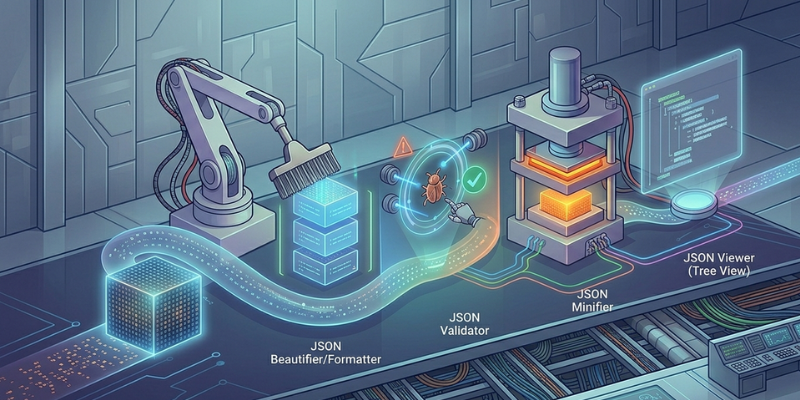
| Tool | What It Does | When You Need It |
|---|---|---|
| Beautifier | Adds indentation and line breaks to make JSON readable | “I can’t read this wall of text” |
| Formatter | Same as beautifier, 99% of the time | Same as above (yes, really) |
| Validator | Checks if JSON follows the rules; tells you what’s broken | “Something’s wrong but I don’t know what” |
| Minifier | Removes whitespace to shrink file size | “I need to ship this to production” |
That table covers most of what you need. The rest of this post explains the nuances – and the one big myth that confuses everybody.
1. JSON Beautifier
A beautifier takes ugly, compressed JSON and turns it into something a human can actually read.
Input:
json

{"name":"Alice","age":30,"items":["apple","banana"]}
Output:
json

{
  "name": "Alice",
  "age": 30,
  "items": ["apple", "banana"]
}
That’s it. The data is identical — only the spacing changes. Same bytes of information, just rearranged so your eyes can parse them.
When you’d use it:
- Reading an API response that came back as one long line
- Understanding a config file someone else wrote
- Debugging – formatted JSON shows you exactly where each property sits
You’ll sometimes see this called “pretty print” or “prettifying”. Old programmer term, same thing. Try our JSON beautifier if you want to see it work – paste any minified JSON and it formats instantly.
2. JSON Formatter
Here’s where I have to be honest with you: in 99% of tools, “JSON formatter” and “JSON beautifier” mean the exact same thing.
You’ll see the terms used interchangeably across the entire web – and that’s not wrong, just confusing for anyone trying to figure out which tool they need.
The technical hair-split (if you care):
- “Beautifier” specifically means making JSON pretty by adding whitespace
- “Formatter” is broader – it could theoretically mean any transformation of format, including converting JSON to other things like CSV or XML
But in practice? When a tool’s homepage says “JSON formatter”, it means “JSON beautifier”. Don’t overthink it.
The one exception: if a tool calls itself a “JSON formatter” and offers conversion to other formats like XML or CSV, then “formatter” is being used in the broader sense. In that case, beautify is just one option among several.
For the rest of this post, treat “beautifier” and “formatter” as synonyms. Because they basically are.
3. JSON Validator
A validator is a different beast entirely. It doesn’t change your JSON — it inspects it.
A validator reads through your JSON and checks every character against the official rules of the JSON specification. If anything is off (a trailing comma, a single quote, a missing bracket), it tells you what’s wrong and, ideally, where.
Example of what it catches:
json

{
  "name": "Alice",
  "age": 30,
}
A validator would flag this immediately: Unexpected token } at position 32. JSON does not allow trailing commas.
When you’d use a validator:
- An API call is failing and you suspect the JSON is bad
- You wrote a config file by hand and want to confirm it’ll work
- You’re receiving JSON from another team and want to verify it before your code touches it
- Debugging cryptic “Unexpected token” errors
This is the most underrated tool in the JSON toolkit. Beautifying broken JSON often doesn’t even work – most beautifiers can’t pretty-print invalid input. A validator points to the exact character where things went wrong, so you can fix it and then beautify.
If you want a deep dive into the errors validators most commonly flag, we covered the 10 most common JSON errors in a separate post. Worth a read before you spend an hour debugging.
4. JSON Minifier
A minifier is the opposite of a beautifier. It rips out every space, tab, and newline so your JSON takes up as little room as possible.
Input:
json

{
  "name": "Alice",
  "age": 30
}
Output:
json

{"name":"Alice","age":30}
When you’d use it:
- Sending JSON over a network (smaller payload = faster transfer)
- Storing JSON in production environments where bandwidth or storage costs scale
- Embedding JSON inside URL parameters or HTML attributes
- API responses that get called millions of times a day
Real-world impact: on a typical 50KB JSON file, minification usually saves 15–30% of the size. Sometimes more if the original had heavy indentation. Across millions of API requests, that bandwidth saving adds up fast.
The catch: minified JSON is hostile to read. Never commit minified JSON to a Git repo if a human will ever need to look at it. Always keep the human-readable version in source control, and minify only at build or deploy time.
The Hidden Fifth Player: The JSON Viewer (Tree View)
There’s a fifth function nobody puts in the headline, but every good JSON tool has it: tree view.
This isn’t beautification, validation, or minification. It’s structural exploration.
Tree view turns this:
json

{
  "user": {
    "name": "Alice",
    "address": {
      "city": "Bangalore",
      "country": "India"
    },
    "orders": [
      {"id": 1, "total": 250},
      {"id": 2, "total": 175}
    ]
  }
}
Into a collapsible, navigable tree where you can drill into nested objects, search for keys, and copy specific paths to clipboard.
This is the function you actually want for big JSON files. A beautified 5,000-line JSON is still a 5,000-line wall of text. A tree view lets you collapse what you don’t care about and focus on what you do. If you ever work with large API responses or log dumps, tree view will become your favorite tool – even if you didn’t know it had a name.
Which One Do You Actually Need?
A simple decision flow:
- “I can’t read this JSON” → Beautifier / Formatter
- “Something’s wrong but I don’t know what” → Validator
- “It’s huge and I just need to explore it” → Tree Viewer
- “I need to make this file smaller for production” → Minifier
Here’s the thing most beginners don’t realize: nearly every modern online JSON tool, including json-beautifier.org – does all of these in one interface. You paste your JSON once and switch between functions with a click. You don’t need four different sites.
Four Common Misconceptions
These trip up developers all the time. Worth clearing up:
“I need a separate validator to check if my JSON is valid.” Not really. Any decent beautifier validates as it formats – if your JSON has errors, the beautifier will either fail or highlight the problem. The validator function gives you a dedicated, focused view of just the validation result, which is helpful when you’re debugging.
“Minified JSON is faster to process.” False. Minified JSON is only faster to transfer. Once a parser reads it into memory, the in-memory representation is identical to the beautified version. Your code runs at the same speed either way.
“Beautifying changes my data.” Never. A beautifier only adds whitespace. The data itself is byte-for-byte identical to your original input. If you parse the beautified version, you get the exact same object as the minified version.
“I should validate, then beautify, then minify everything I touch.” Usually overkill. If your build pipeline produces valid JSON, you only need to minify for production. Validation matters most when you’re consuming JSON from somewhere you don’t fully control — API responses, user uploads, third-party configs.
The Honest Bottom Line
If you remember nothing else from this post, remember this:
Beautifier and Formatter are the same thing. They make JSON readable. Validator tells you if your JSON is broken. Minifier makes JSON small for production. Tree Viewer lets you explore big JSON without going cross-eyed.
Most of the time, when developers say “I need a JSON formatter,” they mean “I need a tool that does all four.”And that’s totally fair, because in practice, that’s what every good tool actually is.
If you want to try all four functions in one place, json-beautifier.org runs entirely in your browser (your JSON never gets uploaded to a server, which matters more than people realize).
Now you’ll never click the wrong button again.